CLIC challenges show how your child uses the maths they know, one skill at a time, so the next step is always the right one.
Tap CLIC in the Glade. Your child taps the CLIC totem in their Glade to begin.
A Flying Start. The first CLIC or Learn Its challenge of a visit may begin with three familiar warm-up questions, before the challenge itself. They are extra and do not count towards anything.
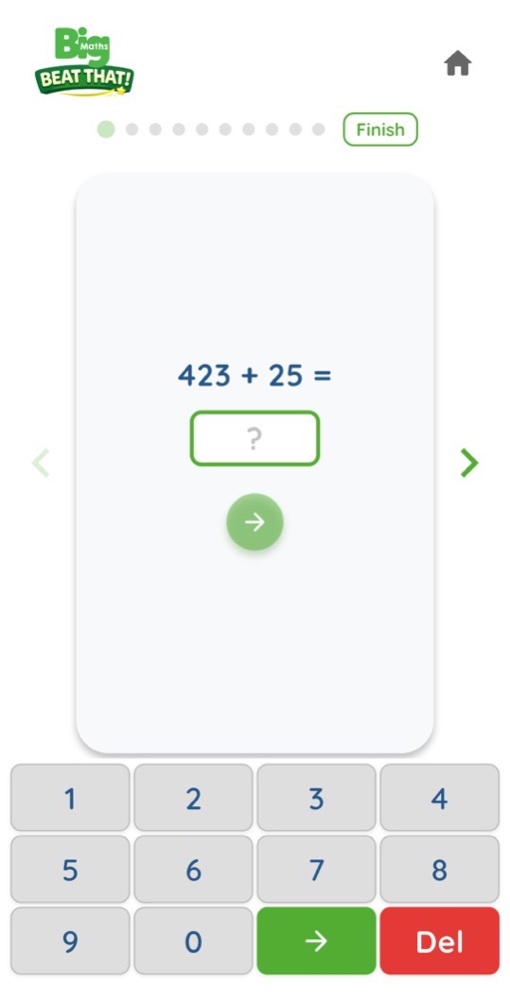
Ten questions, ten skills. A CLIC challenge asks one question at a time, each on a different skill. Your child types on the keypad and taps the green arrow to answer. At the end, they tap Finish.
Moving on. Usually, eight skills out of ten is enough to move forward, so one tricky question never holds your child back. Your child never sees a score.
A quick check after a slip. If a skill was tricky, one extra question on it may quietly appear in the next CLIC challenge. If it stays tricky, the app offers extra help: see Practice.
By the way…
Your child can play one CLIC challenge and stop. There is no need to do Learn Its in the same visit.